








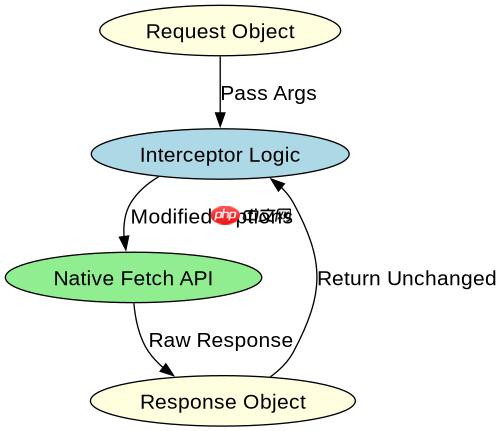
通过重写全局 fetch 函数并调用原始实现,可以拦截所有请求。具体做法是保存原始的 window.fetch 引用,然后定义一个新的 fetch 函数,在内部先处理逻辑(如添加 token),再调用原始函数返回 promise。

如何确保拦截器不影响原有响应数据
拦截器只负责修改请求配置,不应改变响应的数据结构。直接返回原始 fetch 的 Promise 即可,无需解构或重新包装响应对象,这样能保持原有的 Response 实例特性。

// 保存原始 fetch
const originalFetch = window.fetch;

// 重写 fetch
window.fetch = async function(...args) {
  // args[0] 是 url, args[1] 是 options
  const [url, options = {}] = args;

  // 1. 修改请求头
  const newOptions = {
    ...options,
    headers: {
      ...options.headers,
      'Authorization': 'Bearer token123'
    }
  };

  // 2. 调用原始 fetch
  return originalFetch(url, newOptions);
};

// 测试
fetch('/api/data').then(res => console.log(res.status));
如何处理异步拦截中的错误
如果拦截逻辑本身发生异常(如获取 Token 失败),需要捕获错误并拒绝 Promise,防止请求挂起。使用 try-catch 包裹拦截逻辑,并在 catch 中返回一个被拒绝的 Promise。
立即学习“Java免费学习笔记(深入)”;

const originalFetch = window.fetch;

window.fetch = async function(...args) {
  try {
    const [url, options = {}] = args;

    // 模拟异步拦截逻辑
    const token = await getToken();

    const newOptions = {
      ...options,
      headers: { ...options.headers, 'Authorization': `Bearer ${token}` }
    };

    return originalFetch(url, newOptions);
  } catch (error) {
    // 拦截失败时拒绝请求
    return Promise.reject(error);
  }
};

async function getToken() {
  // 假设这里可能失败
  if (Math.random() > 0.5) throw new Error('Token expired');
  return 'valid_token';
} 
















