java nio 中的 completionhandler 用于处理异步 i/o 操作的结果,通过实现 completed() 和 failed() 方法来分别处理成功和失败的情况。具体做法是创建一个实现了该接口的匿名内部类或 lambda 表达式(需 java 8+),并将其作为参数传递给异步 i/o 方法,如 asynchronousfilechannel.read() 或 asynchronousserversocketchannel.accept()。当操作完成时,系统会自动调用相应的回调方法,你可以在其中获取结果数据或处理异常。

如何为 AsynchronousFileChannel 的读取操作设置 CompletionHandler
要为 AsynchronousFileChannel 的读取操作设置 CompletionHandler,你需要先打开一个文件通道,然后调用 read() 方法并传入缓冲区、位置以及一个 CompletionHandler 实例。在 completed() 方法中,你可以从缓冲区中读取数据;在 failed() 方法中,你可以处理可能发生的异常。以下是一个完整的示例程序,展示了如何读取文件内容。
import java.nio.ByteBuffer;
import java.nio.channels.AsynchronousFileChannel;
import java.nio.file.Path;
import java.nio.file.Paths;
import java.nio.file.StandardOpenOption;
import java.util.concurrent.Future;

public class AsyncFileReadExample {
    public static void main(String[] args) throws Exception {
        Path path = Paths.get("test.txt");
        // 打开异步文件通道
        try (AsynchronousFileChannel fileChannel = AsynchronousFileChannel.open(
                path, StandardOpenOption.READ)) {

            ByteBuffer buffer = ByteBuffer.allocate(1024);
            long position = 0;

            // 发起异步读取操作
            Future<Integer> result = fileChannel.read(buffer, position,
                    null, new java.nio.channels.CompletionHandler<Integer, Object>() {
                        @Override
                        public void completed(Integer resultBytes, Object attachment) {
                            System.out.println("读取成功,字节数: " + resultBytes);
                            if (resultBytes > 0) {
                                buffer.flip();
                                byte[] data = new byte[resultBytes];
                                buffer.get(data);
                                System.out.println("数据内容: " + new String(data));
                                buffer.clear();
                            }
                        }

                        @Override
                        public void failed(Throwable exc, Object attachment) {
                            System.err.println("读取失败: " + exc.getMessage());
                        }
                    });

            // 等待操作完成(实际应用中通常不需要阻塞主线程)
            result.get();
        }
    }
}
运行上述代码后,如果 test.txt 文件存在且包含内容,控制台将输出读取到的字节数和具体内容。如果文件不存在或发生其他错误,则会在 failed() 方法中打印错误信息。
立即学习“Java免费学习笔记(深入)”;

如何为 AsynchronousServerSocketChannel 的接受连接操作设置 CompletionHandler
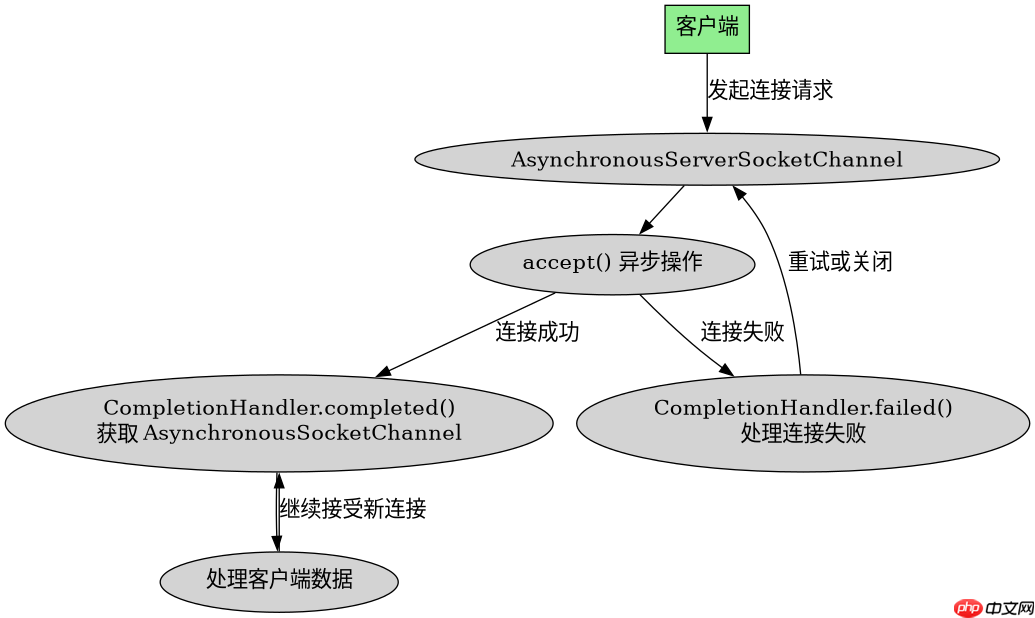
要为 AsynchronousServerSocketChannel 的接受连接操作设置 CompletionHandler,你需要绑定到一个端口,然后调用 accept() 方法并传入一个 CompletionHandler 实例。在 completed() 方法中,你可以获取新建立的 AsynchronousSocketChannel 并进行后续的数据交互;在 failed() 方法中,你可以处理连接失败的异常。以下是一个简单的服务器端示例,展示了如何接受客户端连接。

import java.net.InetSocketAddress;
import java.nio.channels.AsynchronousServerSocketChannel;
import java.nio.channels.AsynchronousSocketChannel;
import java.nio.channels.CompletionHandler;

public class AsyncServerAcceptExample {
    public static void main(String[] args) throws Exception {
        try (AsynchronousServerSocketChannel serverChannel = AsynchronousServerSocketChannel.open()) {
            serverChannel.bind(new InetSocketAddress(8080));
            System.out.println("服务器启动,监听端口 8080");

            // 发起异步接受连接操作
            serverChannel.accept(null, new CompletionHandler<AsynchronousSocketChannel, Object>() {
                @Override
                public void completed(AsynchronousSocketChannel clientChannel, Object attachment) {
                    System.out.println("新客户端连接已建立");
                    // 这里可以进一步处理客户端数据,例如再次调用 read()
                    // 注意:为了持续接受新连接,通常需要递归调用 accept()
                    serverChannel.accept(null, this);
                }

                @Override
                public void failed(Throwable exc, Object attachment) {
                    System.err.println("接受连接失败: " + exc.getMessage());
                }
            });

            // 保持主线程运行
            Thread.sleep(Long.MAX_VALUE);
        }
    }
}
运行上述代码后,服务器将在后台监听 8080 端口。当有客户端连接时,控制台将输出“新客户端连接已建立”,并且服务器会继续接受新的连接。如果连接过程中发生错误,则会在 failed() 方法中打印错误信息。
当 AsynchronousFileChannel 读取的文件大小为 0 时 CompletionHandler 的行为是什么
当 AsynchronousFileChannel 读取的文件大小为 0 时,CompletionHandler 的 completed() 方法仍然会被调用,但返回的 Integer 结果为 0。这意味着没有读取到任何字节,但操作本身是成功的。在这种情况下,你应该检查返回值是否为 0,以避免尝试从空缓冲区中读取数据导致异常。以下是对前一个示例的修改,增加了对零长度文件的处理逻辑。
import java.nio.ByteBuffer;
import java.nio.channels.AsynchronousFileChannel;
import java.nio.file.Path;
import java.nio.file.Paths;
import java.nio.file.StandardOpenOption;
import java.util.concurrent.Future;

public class AsyncFileReadZeroLengthExample {
    public static void main(String[] args) throws Exception {
        Path path = Paths.get("empty.txt");
        try (AsynchronousFileChannel fileChannel = AsynchronousFileChannel.open(
                path, StandardOpenOption.READ)) {

            ByteBuffer buffer = ByteBuffer.allocate(1024);
            long position = 0;

            Future<Integer> result = fileChannel.read(buffer, position,
                    null, new java.nio.channels.CompletionHandler<Integer, Object>() {
                        @Override
                        public void completed(Integer resultBytes, Object attachment) {
                            if (resultBytes == 0) {
                                System.out.println("文件为空,未读取到任何数据");
                            } else {
                                buffer.flip();
                                byte[] data = new byte[resultBytes];
                                buffer.get(data);
                                System.out.println("数据内容: " + new String(data));
                                buffer.clear();
                            }
                        }

                        @Override
                        public void failed(Throwable exc, Object attachment) {
                            System.err.println("读取失败: " + exc.getMessage());
                        }
                    });

            result.get();
        }
    }
}
运行上述代码后,如果 empty.txt 文件存在但内容为空,控制台将输出“文件为空,未读取到任何数据”。这确保了即使文件大小为 0,程序也能正确处理而不会抛出异常。