





在php中,hrtime()更准。它基于操作系统的高分辨率计时器(如linux的clock_monotonic),不受系统时间调整影响,且精度通常达到纳秒级;而microtime()依赖系统时钟,可能受ntp同步或手动修改时间的影响,精度仅为微秒级。
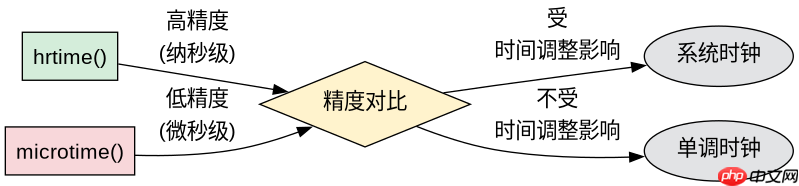
hrtime()与microtime()的精度差异体现在哪里
hrtime()返回的是单调递增的时间戳,确保测量结果不会被系统时钟跳变干扰,适合高精度性能测试;microtime()返回的是当前墙钟时间,若系统在测量期间发生时间校正,会导致耗时计算出现负值或异常偏差。
<?php
// 使用 hrtime() 测量耗时
$start = hrtime(true);
for ($i = 0; $i < 1000000; $i++) {
    // 模拟一些操作
    $x = sqrt($i);
}
$end = hrtime(true);
$duration_ns = $end - $start;
echo "hrtime 耗时: {$duration_ns} 纳秒\n";

// 使用 microtime() 测量耗时
$start_mt = microtime(true);
for ($i = 0; $i < 1000000; $i++) {
    $x = sqrt($i);
}
$end_mt = microtime(true);
$duration_us = ($end_mt - $start_mt) * 1000000;
echo "microtime 耗时: {$duration_us} 微秒\n";
?>
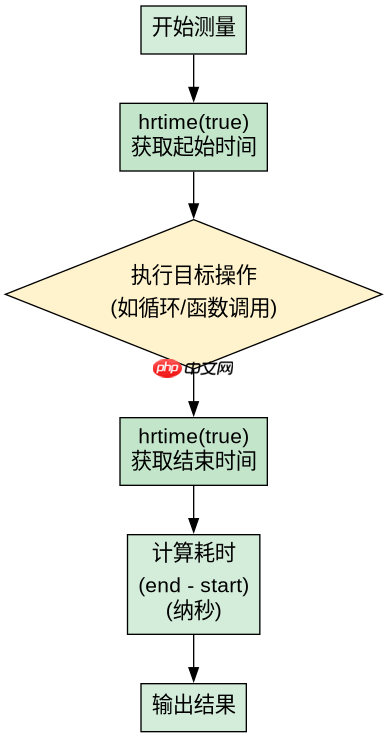
运行上述代码,hrtime()输出的纳秒数能精确反映实际执行时间,而microtime()输出的微秒数可能因系统时钟波动产生微小误差。
立即学习“PHP免费学习笔记(深入)”;

在什么场景下应优先选择hrtime()
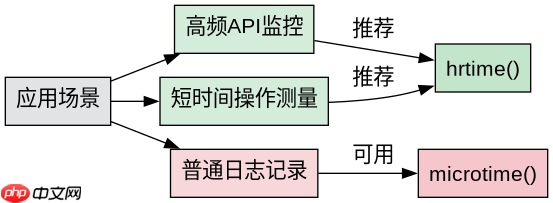
当需要测量极短时间的操作(如函数调用、循环迭代)时,hrtime()的高精度优势明显;而在对精度要求不高的日志记录或普通耗时统计中,microtime()已足够使用。
<?php
// 场景:高频API调用监控
function measure_api_call(callable $func): array {
    $start = hrtime(true);
    $result = $func();
    $end = hrtime(true);
    return [
        'duration_ns' => $end - $start,
        'result' => $result
    ];
}

// 模拟API调用
$result = measure_api_call(function() {
    return file_get_contents('https://api.example.com/data');
});
echo "API调用耗时: {$result['duration_ns']} 纳秒\n";
?>
该示例展示了hrtime()在高频API监控中的应用,其纳秒级精度能捕捉到微小的延迟变化,帮助开发者优化性能瓶颈。
如果系统不支持hrtime()该如何处理
在较旧的PHP版本(低于7.3)或非Unix系统中,hrtime()可能不可用,此时可回退到microtime(),但需注意其精度限制和时钟同步风险。














