




Nginx 推荐使用 include 指令将配置按功能或服务拆分到 /etc/nginx/conf.d/ 目录下,主配置仅保留全局设置,通过 include /etc/nginx/conf.d/*.conf 加载,支持按字母顺序热更新;可按服务维度拆分 upstream 和 location,辅以 security.conf、error-handling.conf 等模块化配置,并注意文件命名排序、语法正确性及 Docker 挂载。
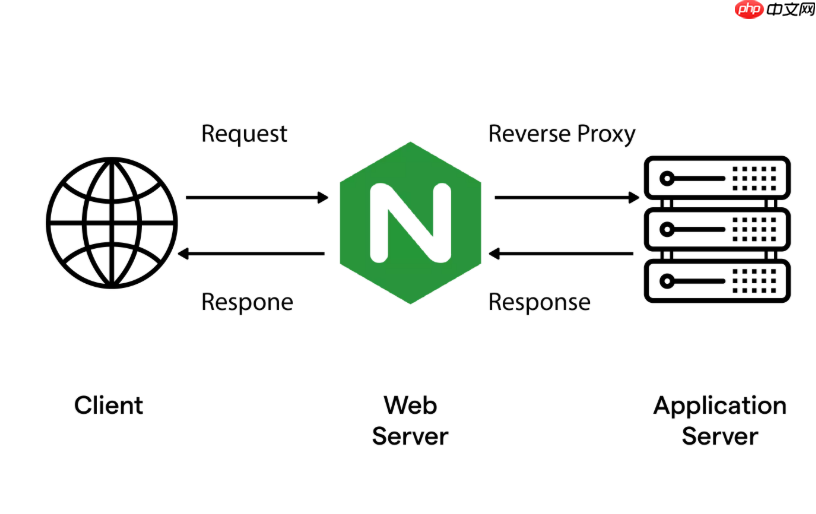
Nginx 使用 include 指令把配置按功能或服务拆分,是管理微服务网关最实用也最推荐的做法。核心思路就是:主配置只保留全局设置,所有路由、上游、SSL等细节都放到 /etc/nginx/conf.d/ 下的独立文件里,既清晰又便于协作和更新。
直接在 nginx.conf 里启用 conf.d
确保主配置文件 /etc/nginx/nginx.conf 的 http 块末尾有这行:
include /etc/nginx/conf.d/*.conf;
这行告诉 Nginx 加载该目录下所有 .conf 文件(按字母顺序读取),无需重启就能生效——只要文件名合法、语法正确,Nginx reload 后立即加载。
按服务维度拆分 upstream 和 location

比如你有两个微服务:用户服务(user-svc)和订单服务(order-svc),可以这样组织:
-
/etc/nginx/conf.d/upstream.conf
定义所有后端服务地址(支持多实例、健康检查):
upstream user-svc {
    server 127.0.0.1:8081 max_fails=3 fail_timeout=30s;
    server 127.0.0.1:8083 backup;  # 备用节点
}

upstream order-svc {
    server 127.0.0.1:8082 weight=2;  # 加权轮询
}-
/etc/nginx/conf.d/api-routes.conf
负责路径路由与代理行为:
server {
    listen 80;
    server_name api.example.com;

    # 用户接口
    location /api/users/ {
        proxy_pass http://user-svc/;
        proxy_set_header Host $host;
        proxy_set_header X-Real-IP $remote_addr;
        proxy_set_header X-Forwarded-For $proxy_add_x_forwarded_for;
        proxy_redirect off;
    }

    # 订单接口
    location /api/orders/ {
        proxy_pass http://order-svc/;
        proxy_set_header Host $host;
        proxy_set_header X-Real-IP $remote_addr;
        proxy_set_header X-Forwarded-For $proxy_add_x_forwarded_for;
        proxy_redirect off;
    }
}
补充常用模块配置(可单独成文件)
-
/etc/nginx/conf.d/security.conf
统一加安全头、禁用敏感方法、限制请求体大小:
# 全局安全头
add_header X-Content-Type-Options "nosniff" always;
add_header X-Frame-Options "DENY" always;
add_header X-XSS-Protection "1; mode=block" always;

# 禁止 TRACE/DELETE 方法
if ($request_method !~ ^(GET|HEAD|POST|PUT|PATCH|OPTIONS|DELETE)$ ) {
    return 405;
}

client_max_body_size 10M;-
/etc/nginx/conf.d/error-handling.conf
统一错误响应格式(如 JSON 404):
error_page 404 /404.json;
location = /404.json {
    internal;
    add_header Content-Type "application/json";
    return 404 '{"code":404,"message":"API not found"}';
}
几个关键注意点
- 文件名建议用前缀排序,例如
00-upstream.conf、10-routes.conf、90-security.conf,避免加载顺序错乱导致变量未定义; - 所有
.conf文件必须以分号结尾,且不能有 BOM 或 UTF-8 不兼容字符; - 修改后执行
sudo nginx -t验证语法,再sudo nginx -s reload生效; - Docker 场景下记得把
/etc/nginx/conf.d/目录挂载为 volume,方便热更新配置。
不复杂但容易忽略。














