


用 systemd 管理 Nginx 需禁用 daemon 模式(daemon off;),配置正确 .service 文件:Type=notify(需 --with-systemd 编译)或 Type=forking,配合 PIDFile、ExecStartPre 校验、KillMode=mixed 等确保生命周期可控。
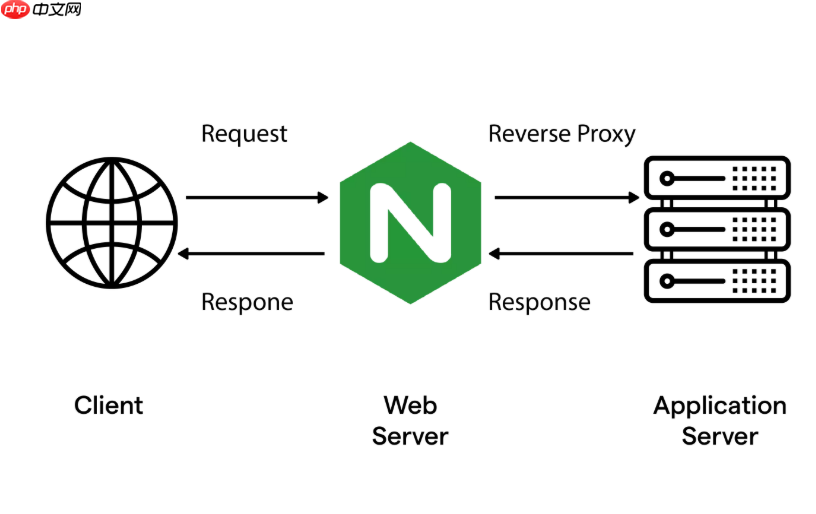
用 systemd 管理 Nginx,核心是写对 .service 文件——它不是简单包装启动命令,而是要准确描述 Nginx 的生命周期、依赖关系和异常行为处理方式。
理解 Nginx 与 systemd 的协作模式
Nginx 默认以守护进程(daemon)模式运行,但 systemd 原生期望服务在前台运行(即不 fork 到后台),否则会误判服务已退出。因此,必须禁用 Nginx 的 daemon 模式,否则 systemctl status nginx 显示 “inactive (dead)” 或反复重启。
正确做法是在 Nginx 配置中设置:
daemon off; —— 写在 /etc/nginx/nginx.conf 的顶层(main 块),通常放在 user 和 worker_processes 之后、events 之前。
若使用发行版默认配置(如 Ubuntu/Debian 的 /etc/nginx/nginx.conf),该行常被注释掉,需手动取消注释或添加。
编写标准的 nginx.service 文件
推荐将自定义 service 文件放在 /etc/systemd/system/nginx.service(覆盖系统自带时优先级更高)。内容示例如下:

[Unit]
Description=A high performance web server
Documentation=man:nginx(8)
After=network.target remote-fs.target nss-lookup.target
Wants=network-online.target
[Service]
Type=notify
PIDFile=/run/nginx.pid
ExecStartPre=/usr/sbin/nginx -t -q -g 'daemon on; master_process on;'
ExecStart=/usr/sbin/nginx -g 'daemon off; master_process on;'
ExecReload=/usr/sbin/nginx -g 'daemon off; master_process on;' -s reload
KillSignal=SIGQUIT
TimeoutStopSec=5
KillMode=mixed
Restart=on-failure
RestartSec=1
RuntimeDirectory=nginx
RuntimeDirectoryMode=0755
[Install]
WantedBy=multi-user.target
关键点说明:
-
Type=notify:要求 Nginx 编译时启用
--with-systemd,并配置master_process on;,这样 Nginx 主进程可通过 sd_notify() 向 systemd 报告就绪状态;若不满足,改用Type=forking并配合PIDFile(见下条) - ExecStartPre:每次启动前校验配置语法,失败则中止启动,避免因配置错误导致服务假死
-
ExecReload:重载时也需保持
daemon off参数一致,否则可能启新进程却未关旧进程 - KillMode=mixed:主进程退出时,同时终止其所有子进程(如 worker),防止残留 worker 占用端口
适配不同发行版与编译场景
并非所有系统预装的 Nginx 都支持 Type=notify:
-
Ubuntu/Debian 官方包:默认不含
--with-systemd,应使用Type=forking,并确保PIDFile=/run/nginx.pid且 Nginx 配置中启用pid /run/nginx.pid; -
CentOS/RHEL 8+ 或自编译 Nginx:可启用
--with-systemd,再配Type=notify,获得更精确的状态反馈(如systemctl is-active nginx返回active而非activating) -
容器或最小化系统:若无
/run目录或权限受限,将PIDFile改为/var/run/nginx.pid,并确保目录存在且可写
验证与调试常见问题
配置完成后执行:sudo systemctl daemon-reloadsudo systemctl enable --now nginx
检查状态:
-
systemctl status nginx:确认显示active (running),无红色报错;若卡在activating (start),大概率是 Nginx 未前台运行或 notify 失败 -
journalctl -u nginx -f:实时查看日志,重点关注启动阶段是否输出nginx: configuration file /etc/nginx/nginx.conf test is successful及后续 error log -
curl -I http://localhost:验证服务响应,排除端口、防火墙、SELinux(RHEL/CentOS)干扰
典型故障信号:
- “Failed with result ‘timeout’” →
TimeoutStopSec过短或 Nginx 关闭缓慢,调大至 10–30 秒 - “Main process exited, code=exited, status=1/FAILURE” → 配置语法错误、证书路径不对、端口被占,看 journal 日志定位
- “Unit nginx.service entered failed state” → 常因
ExecStartPre中的nginx -t失败,先手动运行该命令排查














