1,准备要素
1)替换字体的js文件
js代码:
function com_stewartspeak_replacement() {
/*
Dynamic Heading Generator
By Stewart Rosenberger
http://www.stewartspeak.com/headings/
This script searches through a web page for specific or general elements
and replaces them with dynamically generated images, in conjunction with
a server-side script.
*/
replaceSelector("h1","dynatext/heading.php",true);//前两个参数需要修改
var testURL = "dynatext/loading.gif" ;//修改为对应的图片路径
var doNotPrintImages = false;
var printerCSS = "replacement-print.css";
var hideFlicker = false;
var hideFlickerCSS = "replacement-screen.css";
var hideFlickerTimeout = 100;//这里可以做相应的修改
/* ---------------------------------------------------------------------------
For basic usage, you should not need to edit anything below this comment.
If you need to further customize this script's abilities, make sure
you're familiar with Javascript. And grab a soda or something.
*/
var items;
var imageLoaded = false;
var documentLoaded = false;
function replaceSelector(selector,url,wordwrap)
{
if(typeof items == "undefined")
items = new Array();
items[items.length] = {selector: selector, url: url, wordwrap: wordwrap};
}
if(hideFlicker)
{
document.write('<link id="hide-flicker" rel="stylesheet" media="screen" href="' + hideFlickerCSS + '" />');
window.flickerCheck = function()
{
if(!imageLoaded)
setStyleSheetState('hide-flicker',false);
};
setTimeout('window.flickerCheck();',hideFlickerTimeout)
}
if(doNotPrintImages)
document.write('<link id="print-text" rel="stylesheet" media="print" href="' + printerCSS + '" />');
var test = new Image();
test.onload = function() { imageLoaded = true; if(documentLoaded) replacement(); };
test.src = testURL + "?date=" + (new Date()).getTime();
addLoadHandler(function(){ documentLoaded = true; if(imageLoaded) replacement(); });
function documentLoad()
{
documentLoaded = true;
if(imageLoaded)
replacement();
}
function replacement()
{
for(var i=0;i<items.length;i++)
{
var elements = getElementsBySelector(items[i].selector);
if(elements.length > 0) for(var j=0;j<elements.length;j++)
{
if(!elements[j])
continue ;
var text = extractText(elements[j]);
while(elements[j].hasChildNodes())
elements[j].removeChild(elements[j].firstChild);
var tokens = items[i].wordwrap ? text.split(' ') : [text] ;
for(var k=0;k<tokens.length;k++)
{
var url = items[i].url + "?text="+escape(tokens[k]+' ')+"&selector="+escape(items[i].selector);
var image = document.createElement("img");
image.className = "replacement";
image.alt = tokens[k] ;
image.src = url;
elements[j].appendChild(image);
}
if(doNotPrintImages)
{
var span = document.createElement("span");
span.style.display = 'none';
span.className = "print-text";
span.appendChild(document.createTextNode(text));
elements[j].appendChild(span);
}
}
}
if(hideFlicker)
setStyleSheetState('hide-flicker',false);
}
function addLoadHandler(handler)
{
if(window.addEventListener)
{
window.addEventListener("load",handler,false);
}
else if(window.attachEvent)
{
window.attachEvent("onload",handler);
}
else if(window.onload)
{
var oldHandler = window.onload;
window.onload = function piggyback()
{
oldHandler();
handler();
};
}
else
{
window.onload = handler;
}
}
function setStyleSheetState(id,enabled)
{
var sheet = document.getElementById(id);
if(sheet)
sheet.disabled = (!enabled);
}
function extractText(element)
{
if(typeof element == "string")
return element;
else if(typeof element == "undefined")
return element;
else if(element.innerText)
return element.innerText;
var text = "";
var kids = element.childNodes;
for(var i=0;i<kids.length;i++)
{
if(kids[i].nodeType == 1)
text += extractText(kids[i]);
else if(kids[i].nodeType == 3)
text += kids[i].nodeValue;
}
return text;
}
/*
Finds elements on page that match a given CSS selector rule. Some
complicated rules are not compatible.
Based on Simon Willison's excellent "getElementsBySelector" function.
Original code (with comments and description):
http://simon.incutio.com/archive/2003/03/25/getElementsBySelector
*/
function getElementsBySelector(selector)
{
var tokens = selector.split(' ');
var currentContext = new Array(document);
for(var i=0;i<tokens.length;i++)
{
token = tokens[i].replace(/^s+/,'').replace(/s+$/,'');
if(token.indexOf('#') > -1)
{
var bits = token.split('#');
var tagName = bits[0];
var id = bits[1];
var element = document.getElementById(id);
if(tagName && element.nodeName.toLowerCase() != tagName)
return new Array();
currentContext = new Array(element);
continue;
}
if(token.indexOf('.') > -1)
{
var bits = token.split('.');
var tagName = bits[0];
var className = bits[1];
if(!tagName)
tagName = '*';
var found = new Array;
var foundCount = 0;
for(var h=0;h<currentContext.length;h++)
{
var elements;
if(tagName == '*')
elements = currentContext[h].all ? currentContext[h].all : currentContext[h].getElementsByTagName('*');
else
elements = currentContext[h].getElementsByTagName(tagName);
for(var j=0;j<elements.length;j++)
found[foundCount++] = elements[j];
}
currentContext = new Array;
var currentContextIndex = 0;
for(var k=0;k<found.length;k++)
{
if(found[k].className && found[k].className.match(new RegExp('\b'+className+'\b')))
currentContext[currentContextIndex++] = found[k];
}
continue;
}
if(token.match(/^(w*)[(w+)([=~|^$*]?)=?"?([^]"]*)"?]$/))
{
var tagName = RegExp.$1;
var attrName = RegExp.$2;
var attrOperator = RegExp.$3;
var attrValue = RegExp.$4;
if(!tagName)
tagName = '*';
var found = new Array;
var foundCount = 0;
for(var h=0;h<currentContext.length;h++)
{
var elements;
if(tagName == '*')
elements = currentContext[h].all ? currentContext[h].all : currentContext[h].getElementsByTagName('*');
else
elements = currentContext[h].getElementsByTagName(tagName);
for(var j=0;j<elements.length;j++)
found[foundCount++] = elements[j];
}
currentContext = new Array;
var currentContextIndex = 0;
var checkFunction;
switch(attrOperator)
{
case '=':
checkFunction = function(e) { return (e.getAttribute(attrName) == attrValue); };
break;
case '~':
checkFunction = function(e) { return (e.getAttribute(attrName).match(new RegExp('\b'+attrValue+'\b'))); };
break;
case '|':
checkFunction = function(e) { return (e.getAttribute(attrName).match(new RegExp('^'+attrValue+'-?'))); };
break;
case '^':
checkFunction = function(e) { return (e.getAttribute(attrName).indexOf(attrValue) == 0); };
break;
case '$':
checkFunction = function(e) { return (e.getAttribute(attrName).lastIndexOf(attrValue) == e.getAttribute(attrName).length - attrValue.length); };
break;
case '*':
checkFunction = function(e) { return (e.getAttribute(attrName).indexOf(attrValue) > -1); };
break;
default :
checkFunction = function(e) { return e.getAttribute(attrName); };
}
currentContext = new Array;
var currentContextIndex = 0;
for(var k=0;k<found.length;k++)
{
if(checkFunction(found[k]))
currentContext[currentContextIndex++] = found[k];
}
continue;
}
tagName = token;
var found = new Array;
var foundCount = 0;
for(var h=0;h<currentContext.length;h++)
{
var elements = currentContext[h].getElementsByTagName(tagName);
for(var j=0;j<elements.length; j++)
found[foundCount++] = elements[j];
}
currentContext = found;
}
return currentContext;
}
}// end of scope, execute code
if(document.createElement && document.getElementsByTagName && !navigator.userAgent.match(/opera/?6/i))
com_stewartspeak_replacement();
2)生成图片的php文件
<?php
/*
Dynamic Heading Generator
By Stewart Rosenberger
http://www.stewartspeak.com/headings/
This script generates PNG images of text, written in
the font/size that you specify. These PNG images are passed
back to the browser. Optionally, they can be cached for later use.
If a cached image is found, a new image will not be generated,
and the existing copy will be sent to the browser.
Additional documentation on PHP's image handling capabilities can
be found at http://www.php.net/image/
*/
$font_file = 'trebuc.ttf' ;//可以做相应的xiuga
$font_size = 23 ;//可以做相应的修改
$font_color = '#000000' ;
$background_color = '#ffffff' ;
$transparent_background = true ;
$cache_images = true ;
$cache_folder = 'cache' ;
/*
---------------------------------------------------------------------------
For basic usage, you should not need to edit anything below this comment.
If you need to further customize this script's abilities, make sure you
are familiar with PHP and its image handling capabilities.
---------------------------------------------------------------------------
*/
$mime_type = 'image/png' ;
$extension = '.png' ;
$send_buffer_size = 4096 ;
// check for GD support
if(!function_exists('ImageCreate'))
fatal_error('Error: Server does not support PHP image generation') ;
// clean up text
if(empty($_GET['text']))
fatal_error('Error: No text specified.') ;
$text = $_GET['text'] ;
if(get_magic_quotes_gpc())
$text = stripslashes($text) ;
$text = javascript_to_html($text) ;
// look for cached copy, send if it exists
$hash = md5(basename($font_file) . $font_size . $font_color .
$background_color . $transparent_background . $text) ;
$cache_filename = $cache_folder . '/' . $hash . $extension ;
if($cache_images && ($file = @fopen($cache_filename,'rb')))
{
header('Content-type: ' . $mime_type) ;
while(!feof($file))
print(($buffer = fread($file,$send_buffer_size))) ;
fclose($file) ;
exit ;
}
// check font availability
$font_found = is_readable($font_file) ;
if(!$font_found)
{
fatal_error('Error: The server is missing the specified font.') ;
}
// create image
$background_rgb = hex_to_rgb($background_color) ;
$font_rgb = hex_to_rgb($font_color) ;
$dip = get_dip($font_file,$font_size) ;
$box = @ImageTTFBBox($font_size,0,$font_file,$text) ;
$image = @ImageCreate(abs($box[2]-$box[0]),abs($box[5]-$dip)) ;
if(!$image || !$box)
{
fatal_error('Error: The server could not create this heading image.') ;
}
// allocate colors and draw text
$background_color = @ImageColorAllocate($image,$background_rgb['red'],
$background_rgb['green'],$background_rgb['blue']) ;
$font_color = ImageColorAllocate($image,$font_rgb['red'],
$font_rgb['green'],$font_rgb['blue']) ;
ImageTTFText($image,$font_size,0,-$box[0],abs($box[5]-$box[3])-$box[1],
$font_color,$font_file,$text) ;
// set transparency
if($transparent_background)
ImageColorTransparent($image,$background_color) ;
header('Content-type: ' . $mime_type) ;
ImagePNG($image) ;
// save copy of image for cache
if($cache_images)
{
@ImagePNG($image,$cache_filename) ;
}
ImageDestroy($image) ;
exit ;
/*
try to determine the "dip" (pixels dropped below baseline) of this
font for this size.
*/
function get_dip($font,$size)
{
$test_chars = 'abcdefghijklmnopqrstuvwxyz' .
'ABCDEFGHIJKLMNOPQRSTUVWXYZ' .
'1234567890' .
'!@#$%^&*()'"\/;.,`~<>[]{}-+_-=' ;
$box = @ImageTTFBBox($size,0,$font,$test_chars) ;
return $box[3] ;
}
/*
attempt to create an image containing the error message given.
if this works, the image is sent to the browser. if not, an error
is logged, and passed back to the browser as a 500 code instead.
*/
function fatal_error($message)
{
// send an image
if(function_exists('ImageCreate'))
{
$width = ImageFontWidth(5) * strlen($message) + 10 ;
$height = ImageFontHeight(5) + 10 ;
if($image = ImageCreate($width,$height))
{
$background = ImageColorAllocate($image,255,255,255) ;
$text_color = ImageColorAllocate($image,0,0,0) ;
ImageString($image,5,5,5,$message,$text_color) ;
header('Content-type: image/png') ;
ImagePNG($image) ;
ImageDestroy($image) ;
exit ;
}
}
// send 500 code
header("HTTP/1.0 500 Internal Server Error") ;
print($message) ;
exit ;
}
/*
decode an HTML hex-code into an array of R,G, and B values.
accepts these formats: (case insensitive) #ffffff, ffffff, #fff, fff
*/
function hex_to_rgb($hex)
{
// remove '#'
if(substr($hex,0,1) == '#')
$hex = substr($hex,1) ;
// expand short form ('fff') color
if(strlen($hex) == 3)
{
$hex = substr($hex,0,1) . substr($hex,0,1) .
substr($hex,1,1) . substr($hex,1,1) .
substr($hex,2,1) . substr($hex,2,1) ;
}
if(strlen($hex) != 6)
fatal_error('Error: Invalid color "'.$hex.'"') ;
// convert
$rgb['red'] = hexdec(substr($hex,0,2)) ;
$rgb['green'] = hexdec(substr($hex,2,2)) ;
$rgb['blue'] = hexdec(substr($hex,4,2)) ;
return $rgb ;
}
/*
convert embedded, javascript unicode characters into embedded HTML
entities. (e.g. '%u2018' => '‘'). returns the converted string.
*/
function javascript_to_html($text)
{
$matches = null ;
preg_match_all('/%u([0-9A-F]{4})/i',$text,$matches) ;
if(!empty($matches)) for($i=0;$i<sizeof($matches[0]);$i++)
$text = str_replace($matches[0][$i],
'&#'.hexdec($matches[1][$i]).';',$text) ;
return $text ;
}
?>
3)需要的字体
立即学习“PHP免费学习笔记(深入)”;
这里将需要的自己放在与js和php文件同在的一个目录下(也可以修改,但是对应文件也要修改)

4)PHP的GD2库
2,实现的html代码
<?php
//load the popup utils library
//require_once 'include/popup_utils.inc.php';
?>
<!DOCTYPE html PUBLIC "-//W3C//DTD XHTML 1.1//EN"
"http://www.w3.org/TR/xhtml11/DTD/xhtml11.dtd">
<html>
<head>
<title>
Professional Search Engine Optimization with PHP: Table of Contents
</title>
<script type="text/javascript" language="javascript" src="dynatext/replacement.js"></script>
</head>
<body onload="window.resizeTo(800,600);" onresize='setTimeout("window.resizeTo(800,600);", 100)'>
<h1>
Professional Search Engine Optimization with PHP: Table of Contents
</h1>
<?php
//display popup navigation only when visitor comes from a SERP
// display_navigation();
//display_popup_navigation();
?>
<ol>
<li>You: Programmer and Search Engine Marketer</li>
<li>A Primer in Basic SEO</li>
<li>Provocative SE-Friendly URLs</li>
<li>Content Relocation and HTTP Status Codes</li>
<li>Duplicate Content</li>
<li>SE-Friendly HTML and JavaScript</li>
<li>Web Syndication and Social Bookmarking</li>
<li>Black Hat SEO</li>
<li>Sitemaps</li>
<li>Link Bait</li>
<li>IP Cloaking, Geo-Targeting, and IP Delivery</li>
<li>Foreign Language SEO</li>
<li>Coping with Technical Issues</li>
<li>Site Clinic: So You Have a Web Site?</li>
<li>WordPress: Creating a SE-Friendly Weblog?</li>
<li>Introduction to Regular Expression</li>
</ol>
</body>
</html>
3,使用效果前后对比
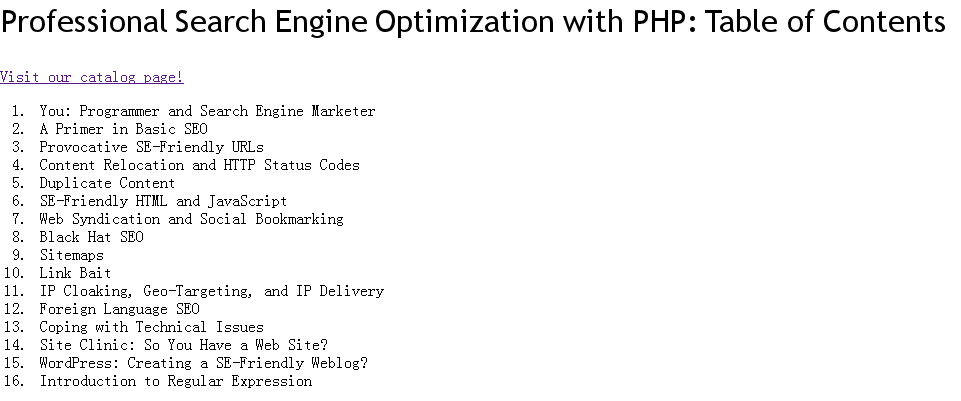
使用前

使用后