





- 前言
我之前介绍过依赖属性和附加属性的代码段,这两个代码段我已经使用了很多年,帮了我不少忙。不过,我已经多年没有对它们进行过修改,resharper总是提示我可以优化生成的代码。这次,我决定采纳它的建议,并顺便简单介绍一下如何自定义代码段。
- VisualStudio自带代码段的问题
以依赖属性为例,一个完整的依赖属性应该包含以下部分:
- 注册依赖属性并生成依赖属性标识符。依赖属性标识符为一个
public static readonly DependencyProperty
字段。依赖属性标识符的名称必须为“属性名+Property”。 - 在
PropertyMetadata
中指定属性默认值。 - 实现属性包装器。为属性提供
get
和set
访问器,在Getter
和Setter
中分别调用GetValue
和SetValue
。Getter
和Setter
中不应该有其它任何自定义代码。 - 如果需要监视属性值变更,可以在
PropertyMetadata
中定义一个PropertyChangedCallback
方法。因为这个方法是静态的,可以再实现一个同名的实例方法(可以参考ContentControl
的OnContentChanged
方法)。
更详尽的规范可以参考《Framework Design Guidelines》。
public int MyProperty{
    get { return (int)GetValue(MyPropertyProperty); }
    set { SetValue(MyPropertyProperty, value); }
}
// Using a DependencyProperty as the backing store for MyProperty.  This enables animation, styling, binding, etc...
public static readonly DependencyProperty MyPropertyProperty =
    DependencyProperty.Register("MyProperty", typeof(int), typeof(ownerclass), new PropertyMetadata(0));
如上所示,VisualStudio自带的依赖属性的代码段
propdp只实现了最基本的功能,
PropertyChangedCallback等函数还需要自己实现,这部分也相当麻烦。另外,
ownerclass基本都是当前类的名字,没有理由不使用当前类的名字作为默认值。
/// <summary>
/// 获取或设置MyProperty的值
/// </summary>
public int MyProperty{
    get => (int)GetValue(MyPropertyProperty);
    set => SetValue(MyPropertyProperty, value);
}
/// <summary>
/// 标识 MyProperty 依赖属性。
/// </summary>
public static readonly DependencyProperty MyPropertyProperty =
    DependencyProperty.Register(nameof(MyProperty), typeof(int), typeof(MainPage), new PropertyMetadata(default(int), OnMyPropertyChanged));
private static void OnMyPropertyChanged(DependencyObject obj, DependencyPropertyChangedEventArgs args){
    var oldValue = (int)args.OldValue;
    var newValue = (int)args.NewValue;
    if (oldValue == newValue)
        return;
    var target = obj as MainPage;
    target?.OnMyPropertyChanged(oldValue, newValue);
}
/// <summary>
/// MyProperty 属性更改时调用此方法。
/// </summary>
/// MyProperty 属性的旧值。
/// MyProperty 属性的新值。
protected virtual void OnMyPropertyChanged(int oldValue, int newValue){}
上面是我自定义的代码段,改进了这些地方:
Getter
和Setter
使用了表达式主体;DependencyProperty.Register
的第一个参数使用了nameof()
关键字代替了字符串;typeof(MainPage)
这里使用了代码段函数ClassName()
直接获取当前类的名称;- 依赖属性的默认值使用了
default()
关键字,因为绝大部分情况下依赖属性的默认值就是数据类型的默认值,修改默认值的工作交给DefaultStyle
的Setter
; - 添加了相对完整的
PropertyChangedCallback
函数。
- 如何自定义代码段
基本上,一个代码段就是一个XML文件,
3.1 代码段的结构
<?xml version="1.0" encoding="utf-8"?>
<codesnippets xmlns="http://schemas.microsoft.com/VisualStudio/2005/CodeSnippet">
    <codesnippet format="1.0.0">
        <keywords>
            <keyword>dp</keyword>
        </keywords>
        <snippettypes>
            <snippettype>SurroundsWith</snippettype>
        </snippettypes>
        <title>Dependency Property</title>
        <author>dino.c</author>
        <description>For Dependency Property</description>
        <helpurl></helpurl>
        <shortcut>dp</shortcut>
        <snippet>
            <references>
                <reference>
                    <assembly></assembly>
                </reference>
            </references>
            <declarations>
                <literal editable="true">
                    <id>PropertyType</id>
                    <tooltip>属性类型</tooltip>
                    <default>int</default>
                    <function></function>
                </literal>
                ...
            </declarations>
        </snippet>
    </codesnippet>
</codesnippets>
如上所示,代码段定义XML中主要分成以下几个部分:
- Header:包括Keyword、Shortcut等信息。Author和Description等可有可无;
- Declarations:代码段中的变量;
- Code:代码段的代码。
3.2 代码段中的变量
在我定义的依赖属性代码段中包含了三个变量:
<literal editable="true">
    <id>PropertyType</id>
    <tooltip>属性类型</tooltip>
    <default>int</default>
    <function></function>
</literal>
<literal editable="true">
    <id>MyProperty</id>
    <tooltip>属性名</tooltip>
    <default>MyProperty</default>
    <function></function>
</literal>
<literal editable="false">
    <id>classname</id>
    <tooltip>类名</tooltip>
    <function>ClassName()</function>
    <default>ClassNamePlaceholder</default>
</literal>
其中
classname不可编辑,它使用了
ClassName()这个代码段函数,返回包含已插入代码段的类的名称。其它可用的代码段函数可以参考这个页面:代码段函数。
引用变量的语法是
$变量名$,如下所示:

public static readonly DependencyProperty $MyProperty$Property =
    DependencyProperty.Register(nameof($MyProperty$), typeof($PropertyType$), typeof($classname$), new PropertyMetadata(default($PropertyType$), On$MyProperty$Changed));
3.3 导入代码段
在菜单上选择“工具->代码片段管理器”:
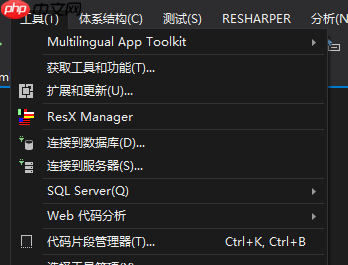
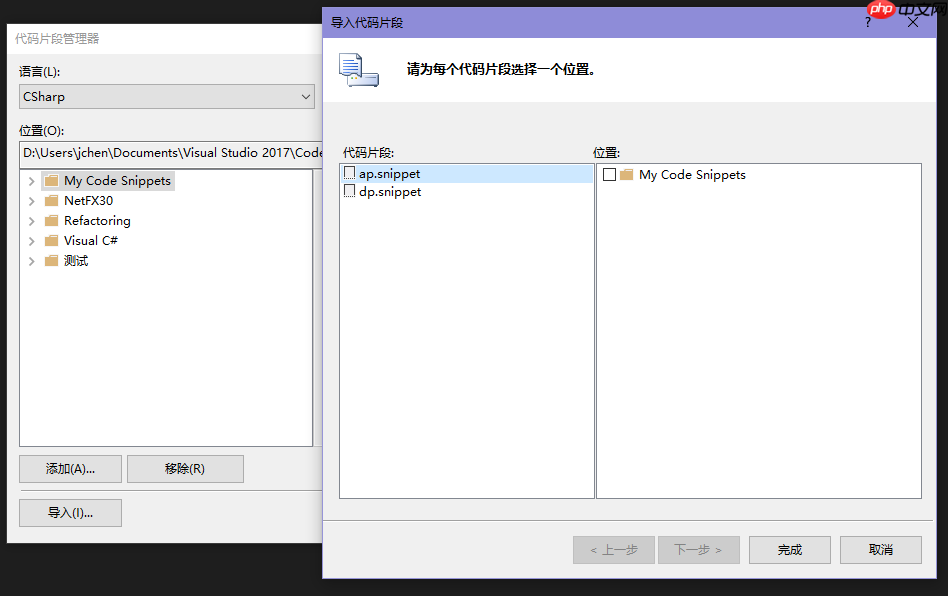
在“代码片段管理器”窗口中点击“导入”,选中需要导入的文件后打开“导入代码片段”,选择位置后点击“完成”即可完成代码段导入:
3.4 最终成果
依赖属性的代码段:
<?xml version="1.0" encoding="utf-8"?>
<codesnippets xmlns="http://schemas.microsoft.com/VisualStudio/2005/CodeSnippet">
    <codesnippet format="1.0.0">
        <keywords>
            <keyword>dp</keyword>
        </keywords>
        <snippettypes>
            <snippettype>SurroundsWith</snippettype>
        </snippettypes>
        <title>Dependency Property</title>
        <author>dino.c</author>
        <description>For Dependency Property</description>
        <helpurl></helpurl>
        <shortcut>dp</shortcut>
        <snippet>
            <references>
                <reference>
                    <assembly></assembly>
                </reference>
            </references>
            <declarations>
                <literal editable="true">
                    <id>PropertyType</id>
                    <tooltip>属性类型</tooltip>
                    <default>int</default>
                    <function></function>
                </literal>
                <literal editable="true">
                    <id>MyProperty</id>
                    <tooltip>属性名</tooltip>
                    <default>MyProperty</default>
                    <function></function>
                </literal>
                <literal editable="false">
                    <id>classname</id>
                    <tooltip>类名</tooltip>
                    <function>ClassName()</function>
                    <default>ClassNamePlaceholder</default>
                </literal>
            </declarations>
            <![CDATA[
            /// <summary>
            /// 获取或设置$MyProperty$的值
            /// </summary>
            public $PropertyType$ $MyProperty$
            {
                get => ($PropertyType$)GetValue($MyProperty$Property);
                set => SetValue($MyProperty$Property, value);
            }
            /// <summary>
            /// 标识 $MyProperty$ 依赖属性。
            /// </summary>
            public static readonly DependencyProperty $MyProperty$Property =
                DependencyProperty.Register(nameof($MyProperty$), typeof($PropertyType$), typeof($classname$), new PropertyMetadata(default($PropertyType$), On$MyProperty$Changed));
            private static void On$MyProperty$Changed(DependencyObject obj,DependencyPropertyChangedEventArgs args)
            {
                var oldValue = ($PropertyType$)args.OldValue;
                var newValue = ($PropertyType$)args.NewValue;
                if (oldValue == newValue)
                    return;

                var target= obj as $classname$;
                target?.On$MyProperty$Changed(oldValue, newValue);
            }
            /// <summary>
            /// $MyProperty$ 属性更改时调用此方法。
            /// </summary>
            /// $MyProperty$ 属性的旧值。
            /// $MyProperty$ 属性的新值。
            protected virtual void On$MyProperty$Changed($PropertyType$ oldValue,$PropertyType$ newValue)
            {
            }
            ]]>
        </snippet>
    </codesnippet>
</codesnippets>
附加属性的代码段:
<?xml version="1.0" encoding="utf-8"?>
<codesnippets xmlns="http://schemas.microsoft.com/VisualStudio/2005/CodeSnippet">
    <codesnippet format="1.0.0">
        <keywords>
            <keyword>ap</keyword>
        </keywords>
        <snippettypes>
            <snippettype>Expansion</snippettype>
        </snippettypes>
        <title>Attached Property</title>
        <author>dino.c</author>
        <description>For Attached Property</description>
        <helpurl></helpurl>
        <shortcut>ap</shortcut>
        <snippet>
            <references>
                <reference>
                    <assembly></assembly>
                </reference>
            </references>
            <declarations>
                <literal editable="true">
                    <id>PropertyType</id>
                    <tooltip>属性类型</tooltip>
                    <default>int</default>
                    <function></function>
                </literal>
                <literal editable="true">
                    <id>MyProperty</id>
                    <tooltip>属性名</tooltip>
                    <default>MyProperty</default>
                    <function></function>
                </literal>
                <literal editable="false">
                    <id>classname</id>
                    <tooltip>类名</tooltip>
                    <function>ClassName()</function>
                    <default>ClassNamePlaceholder</default>
                </literal>
            </declarations>
            <![CDATA[
            /// <summary>
            /// 从指定元素获取 $MyProperty$ 依赖项属性的值。
            /// </summary>
            /// <param name="obj">从中读取属性值的元素。</param>
            /// <returns>从属性存储获取的属性值。</returns>
            public static $PropertyType$ Get$MyProperty$(DependencyObject obj) => ($PropertyType$)obj.GetValue($MyProperty$Property);
            /// <summary>
            /// 将 $MyProperty$ 依赖项属性的值设置为指定元素。
            /// </summary>
            /// <param name="obj">对其设置属性值的元素。</param>
            /// <param name="value">要设置的值。</param>
            public static void Set$MyProperty$(DependencyObject obj, $PropertyType$ value) => obj.SetValue($MyProperty$Property, value);
            /// <summary>
            /// 标识 $MyProperty$ 依赖项属性。
            /// </summary>
            public static readonly DependencyProperty $MyProperty$Property =
                DependencyProperty.RegisterAttached("$MyProperty$", typeof($PropertyType$), typeof($classname$), new PropertyMetadata(default($PropertyType$), On$MyProperty$Changed));
            private static void On$MyProperty$Changed(DependencyObject obj, DependencyPropertyChangedEventArgs args)
            {
                var oldValue = ($PropertyType$)args.OldValue;
                var newValue = ($PropertyType$)args.NewValue;
                if (oldValue == newValue)
                    return;

                var target = obj as $classname$;
            }
            ]]>
        </snippet>
    </codesnippet>
</codesnippets>- 结语
虽然这两个代码段比较复杂,并不是每次创建依赖属性都需要这么完整,但删除代码总比增加代码简单得多,所以我多年来每次创建依赖属性和附加属性都是使用这两个代码段。
WPF的依赖属性可以十分复杂,但平时用不到这么多功能,所以和UWP使用相同的代码段就足够了。
完整的代码段已上传到Github。
- 参考代码段